Second Grade Learning Games SE
RosiMosi LLCEducational
4.7170.00 Reviews
- Version
- 9.2.1
- Installs
- 10.00K
- Age Rating
- Everyone
Screenshots
Our Review of Second Grade Learning Games SE
 Analysis by Appyee
Choosing a learning game for a second grader is less about finding the flashiest app and more about finding a tool that fits the child’s actual routine. I spent time with Second Grade Learning Games SE from RosiMosi LLC, an educational game collection built around lessons suitable for second grade. My overall impression is that it works best as a focused practice companion: something a child can open for a short learning session, explore with limited help, and return to when a particular school skill needs reinforcement.
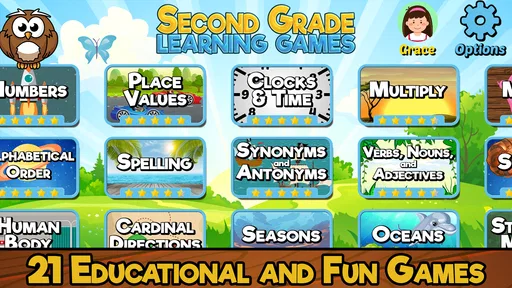
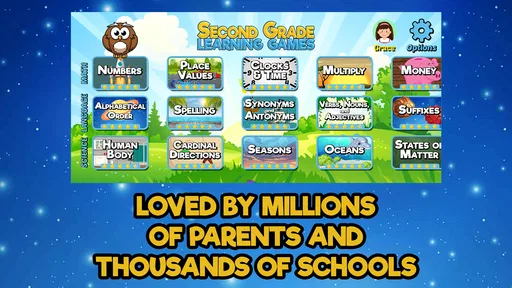
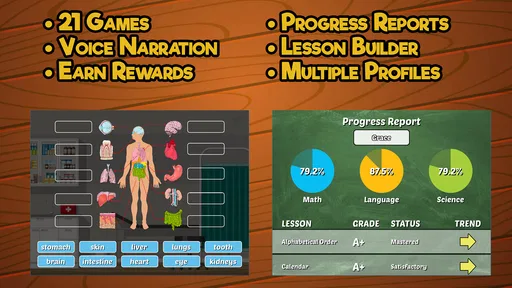
The game brings together twenty-one activities rather than asking families to install a separate app for every subject. That matters in everyday use. A parent who wants a quick practice option after homework can keep one title ready instead of switching between several unrelated programs. At the same time, this is not a replacement for a teacher, a workbook, or a complete home-learning curriculum. Its value comes from repetition, variety, and a more playful presentation of familiar second-grade material.
How I would decide whether it belongs on a child’s device
The first question I would ask is whether the child needs broad practice or help with one very specific weakness. This collection makes more sense for a learner who benefits from moving between different kinds of exercises. If the goal is only multiplication drills, spelling practice, or reading support, a narrowly focused alternative may be easier to manage. Here, the appeal is the range of lessons and the chance to keep practice from feeling identical every time.
I would also consider the child’s independence. Some children can open a game, understand the instruction, and keep going without much adult involvement. Others need someone nearby to explain what a question means or connect the activity to schoolwork. In my experience, the app is most useful when an adult introduces it first, watches how the child responds, and then lets the child take over familiar activities. That small setup step can prevent the game from becoming a source of frustration.
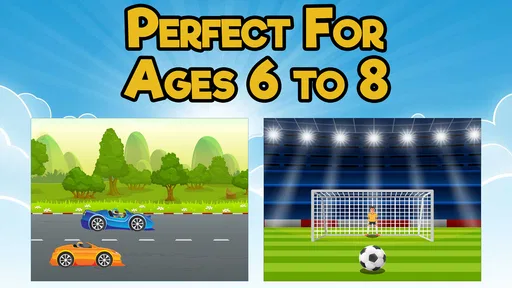
The age positioning is straightforward: it is rated Everyone and aimed at second-grade learning. That makes it a reasonable candidate for a family looking for child-friendly practice, but age labels do not guarantee that every activity will suit every learner. A confident child may move through some material quickly, while a child who is still building foundational skills may need encouragement and repetition. I would judge the fit by observing the child’s comfort with the lessons rather than relying only on the grade label.
Another decision point is how much structure your family wants. A workbook gives a visible sequence, and a teacher-led platform may offer more formal progress management. This game feels better suited to flexible practice: a few minutes before dinner, a quiet activity during travel, or an occasional change from paper exercises. That flexibility is a strength, but it also means the parent has to provide the larger plan.
The current release is version 9.2.1 and requires at least iOS or Android 8.0, depending on the device. I would check an older family tablet before paying, especially if it has been sitting unused for years. Compatibility is a practical issue that can overshadow the educational value if the device cannot run the game comfortably.
The strongest reason to choose this collection
The biggest advantage is concentration. Instead of scattering a child’s attention across several educational downloads, this game presents a single place for second-grade practice. I like that arrangement for families that want simplicity. It reduces the number of icons a child has to recognize and gives parents one app to remember when they suggest a learning activity.
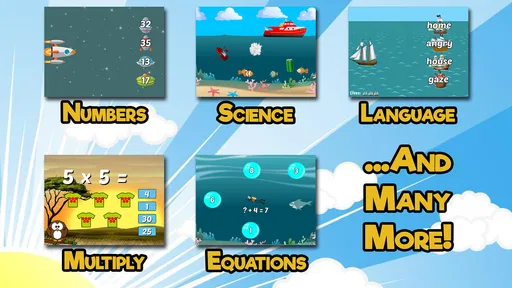
The twenty-one-game format also creates useful variety. A child who becomes tired of one type of question can move to another kind of lesson without abandoning the learning session completely. That does not automatically make every activity equally engaging, but it gives the parent more ways to keep practice moving. In a home setting, that can be the difference between a productive ten-minute session and a child deciding that educational screen time is boring.
One practical technique I found valuable is to use the collection as a warm-up rather than a reward. Before homework, a child can spend a short period on an activity connected to the day’s school topic. Afterward, the parent can ask the child to explain one answer or show how the game approached the problem. This turns passive tapping into a quick conversation about the skill being practiced.
A second useful approach is to rotate activities deliberately. Rather than allowing the child to choose the same comfortable game every time, I would alternate a familiar activity with one that requires more effort. The familiar choice helps maintain confidence, while the harder one reveals where support may be needed. This is a better use of a multi-game collection than treating it as an endless free-play menu.
I also see value in using it during short gaps in the day. A long session is not necessary for this kind of practice, and children often learn better when a task does not feel like a second school day. A few questions while waiting for an appointment or a brief activity after a reading break may be more effective than insisting on one extended block of screen time.
What the experience feels like in a family routine
Imagine a child returning from school with a worksheet that caused trouble. The parent does not want to turn the evening into another formal lesson, so they open the game and let the child try a related activity. If the child succeeds, the parent can ask what made the answer work. If the child struggles again, that is useful information: the difficulty may need a pencil-and-paper explanation or a teacher’s help rather than more guessing on the screen.
That scenario shows both the strength and the limit of the app. It can lower the barrier to practice because the child is interacting with a game instead of facing another worksheet. But it cannot replace the adult’s interpretation of mistakes. A wrong answer may come from misunderstanding the lesson, rushing, reading difficulty, or simply tapping too quickly. I would not use the score or outcome of one session as a complete measure of learning.
For independent use, I would establish a simple routine: choose one activity, complete a short round, and then tell an adult one thing that was easy or difficult. This gives the child ownership while keeping the app connected to real learning. It also helps prevent the device from becoming an unstructured way to pass time.
For siblings, the collection may be useful when children need different levels of attention at once, but I would avoid turning it into a competition. Second graders can have very different strengths, and comparing speed can make a practice tool feel like a test. The better comparison is with the child’s own previous comfort and understanding.
Where a different type of learning app may fit better
This game is not automatically the best choice for every educational goal. A child who needs intensive reading intervention may benefit more from a specialized reading program with a carefully sequenced approach. A learner preparing for a particular classroom assessment may need a workbook or teacher-recommended resource that mirrors the exact curriculum. A child who dislikes game-style learning may also prefer physical cards, manipulatives, or direct instruction.
Families looking for detailed parent reports should compare this collection with platforms designed around monitoring and long-term study plans. I would choose those alternatives when an adult needs a clearer record of completed lessons or wants a more formal path from one skill to the next. The appeal here is breadth and convenience, not a promise of a full academic dashboard.
There is also a difference between practice and discovery. If your child is curious about science, history, or creative projects, a second-grade game collection may feel too focused on school-style exercises. It can support core practice, but it is not the kind of resource I would use as the only educational content on a device.
Screen habits matter as well. Some children become absorbed in games and resist stopping, even when the content is educational. In that situation, I would set the time boundary before opening the app and use a visible household routine to signal when the session ends. The learning label does not remove the need for normal screen-time guidance.
Price, commitment, and the cost of changing tools
The listed price is $9.99, so I would treat the purchase as a decision about convenience rather than an impulse download. The value depends on whether the child will actually use several of the activities. If only one lesson type is relevant, a more focused option may offer a better match. If the family wants a compact collection for ongoing second-grade practice, paying once for a broad set can feel more reasonable than collecting several separate titles.
Before switching from a familiar workbook or learning platform, I would try the game alongside the existing routine instead of replacing everything immediately. Give the child a few short sessions and watch three things: whether the instructions are understood, whether the child can work without constant prompting, and whether the activities lead to discussion beyond the screen. If those signs are positive, the app has earned a regular place.
The cost of switching is not only financial. A child may already understand the rhythm of another resource, and changing tools can create unnecessary friction. Parents also need to learn where the useful activities are and how to guide the child through them. The collection’s advantage is that this learning curve should happen inside one app, but it still takes a little time to discover which activities suit the child best.
I would make the purchase more confidently for a household that wants a reusable practice library rather than a one-week novelty. The developer, RosiMosi LLC, has kept this title available as an established product since February 5, 2013, and it has reached over ten thousand installs. Those figures do not prove that it will suit every learner, but they do suggest that it has found a continuing audience among families seeking this kind of resource.
My recommendation for different kinds of learners
I recommend Second Grade Learning Games SE to parents of second graders who want one child-friendly educational game with enough variety to support short, informal practice sessions. I especially like it for families that do not want a complicated learning platform and for children who respond well to switching between activities. The average rating is 4.7 from more than six hundred ratings, which is encouraging, although I would still base the decision on the child’s learning style rather than popularity alone.
I would skip it when the main need is specialized intervention, detailed progress tracking, or a strict curriculum sequence. In those cases, a teacher-guided resource or a subject-specific app is likely to be a better investment. I would also hesitate if the child becomes frustrated by game interfaces or needs an adult to translate every instruction.
My best advice is to treat the app as a flexible practice shelf, not as a digital teacher. Choose activities with a purpose, keep sessions short, and connect at least one screen answer to a real-world explanation, a written example, or a conversation. That workflow makes the collection more meaningful than simply handing over a device.
For the right child, the combination of second-grade focus, twenty-one activities, and a relatively simple one-app setup makes this a practical choice. It will not do the planning for a parent, and it should not replace classroom teaching, but it can make extra practice easier to start. If that is the gap in your family’s routine, I think this is a sensible purchase; if you need precision, reporting, or deeper subject specialization, I would look elsewhere.
Verdict
Strengths of Second Grade Learning Games SE
- Covers core second-grade subjects through short, focused activities.
- Bright visuals and simple controls are suitable for younger children.
- Progressive difficulty helps children practice skills at their own pace.
- Works well for quick practice sessions at home or during travel.
- Activities provide immediate feedback to reinforce correct answers.
Limitations of Second Grade Learning Games SE
- Some activities may feel repetitive after extended play.
- The interface can seem dated compared with newer learning apps.
- Advanced learners may outgrow the content fairly quickly.
- Certain lessons offer limited explanations for incorrect answers.
- Parents may want more detailed progress and performance reports.
Other Releases by RosiMosi LLC
View All
Barnyard Games For Kids
Educational4.1

Second Grade Learning Games
Educational4.1

Third Grade Learning Games
Educational3.9

First Grade Learning Games
Educational4.1
Similar Picks in This Category
View All
Little Panda Policeman
BabyBus4.0

Monster Trucks Game for Kids 2
Raz Games4.1

Little Panda's Chinese Recipes
BabyBus4.4

Little Panda's Restaurant
BabyBus4.4

Little Panda's Ice Cream Games
BabyBus4.3

Baby Panda Care
BabyBus3.8
Frequently Asked Questions
What is Second Grade Learning Games SE, and who is it designed for?
Second Grade Learning Games SE is an educational app designed mainly for children in second grade, generally around seven or eight years old. It offers short, interactive activities that practice foundational subjects such as mathematics, reading, spelling, grammar, and basic science. The lessons are presented in a game-like format, making the app suitable for children who learn better through repetition, visual prompts, and hands-on interaction rather than traditional worksheets.
What subjects and skills can children practice in the app?
The app covers several important second-grade learning skills in one place. Depending on the available game section, children may practice addition and subtraction, place value, multiplication basics, reading comprehension, spelling, vocabulary, grammar, punctuation, and general knowledge. Activities are usually divided into small challenges, so children can focus on one skill at a time. Parents should still check the specific content included in their version, as features may vary by platform or update.
Is Second Grade Learning Games SE suitable for independent learning?
Children can complete many of the activities independently because the app uses simple instructions, visual examples, and immediate feedback. However, younger learners may still need occasional help when they encounter unfamiliar vocabulary, make repeated mistakes, or do not understand what an exercise is asking. The app works best as a supplement to schoolwork, with a parent or teacher checking progress and discussing difficult questions rather than treating it as a complete replacement for classroom instruction.
Does the app require an internet connection or include advertisements and in-app purchases?
Many learning games can be used without a continuous internet connection after installation, which is convenient for travel or limited-access situations, although downloading, updates, and certain features may require internet access. The exact advertising and purchase model can depend on the edition downloaded from Google Play or the App Store. Before installing, parents should review the store listing, permissions, privacy information, and purchase settings, and use parental controls if the device is shared with a child.
Is Second Grade Learning Games SE safe and effective for children?
The app is designed for children and focuses on educational practice rather than social interaction, which makes it a relatively straightforward option for home learning. Its effectiveness depends on regular use, appropriate difficulty, and whether the child receives guidance when needed. Parents should supervise the first sessions, confirm that the content matches the child’s school curriculum, and monitor screen time. As with any educational app, it should support—not replace—reading, writing, play, and teacher-led learning.
Play our best games!


